

Many SaaS monitoring tools are built for large or specialized teams and offer many features for different requirements and workflows. But small teams and solo devs often don't need all of that. They prefer tools with only the features they'll actually use, that they can host themselves, and, ideally, that are open-source. Unfortunately, that often means missing out on one important feature: global testing.
In this blog post, we'll compare four open-source monitoring tools that solve exactly that by integrating with Globalping for global testing. We'll focus on helping you choose the right fit: what each tool does, how it uses Globalping, and who it's best suited for. By the end, we hope you can find one or two tools worth trying.
Why use a self-hosted uptime monitor that integrates Globalping?
One of the main reasons to choose a self-hosted, open-source tool is cost. Smaller dev teams and solo developers often don't want to add another SaaS subscription to their stack. But that's not the only reason: many paid solutions target specialized teams or large enterprises and come with a vast feature catalog that smaller teams may find bloated. Keeping control of your own data and tools also matters, and you can mostly only get that with a self-hosted tool.
Naturally, this approach also has downsides: with most open-source solutions, you’re limited to monitoring uptime from wherever the monitor runs. If you use a cloud provider, you can usually spin up monitors in a handful of regions, but you're still limited to that provider's available locations and infrastructure.
So what if you need to monitor from a specific ISP, city, or residential network? This is where Globalping comes in: it provides free access to more than 5000 community-hosted probes worldwide that can run networking tests for you.
Four open-source uptime monitors currently offer Globalping integrations, and each one works a little differently. Next, we'll walk through each one, explain what it does, how it uses Globalping, and who it's best suited for.
Four uptime monitoring tools with global testing capabilities
UptimeFlare
UptimeFlare is a serverless uptime monitor and status page that runs on Cloudflare Workers. It checks HTTP(S) and TCP endpoints with customizable request methods, headers, and more. It provides a status page and lets you integrate with more than 100 notification channels or use webhooks for custom development.
UptimeFlare’s developer built a Globalping integration that lets you run tests outside Cloudflare’s network. This means that users can run checks from residential networks and virtually any geographical location and ISP.
To create a monitor with Globalping, add it via globalping:// in checkProxy, with a magic location parameter in your config file. For example, this monitor runs HTTP GET from random Globalping probes in the US:
{
 id: 'globalping',
 name: 'Globalping',
 method: 'GET',
 target: 'https://globalping.io/',
 checkProxy: 'globalping://abcdef123456/?magic=US'
}
Define any location supported by Globalping, and add your Globalping API token directly to the URL to authenticate with your Globalping Dashboard account, as shown above.
UptimeFlare is a great solution for teams already on Cloudflare who want to avoid managing servers, need a focused monitor, and want their own status page.
Read our blog post to learn more about using UptimeFlare and Globalping.
Uptime Kuma
Uptime Kuma lets you monitor HTTP(S) domains, keywords on webpages, DNS records, SSL certificates, Docker Containers, Steam game servers, and databases. It provides a graphical interface to view and manage your monitors, plus customizable status pages available in more than 20 languages. You can quickly set it up with Docker Compose, or without Docker on Linux and Windows servers.
We’ve integrated Globalping as a native monitor type inside the UI. Our integration supports ping (ICMP and TCP), HTTP, and DNS tests. It also lets you define any location type supported by Globalping and add your API key to increase your hourly test allowance.
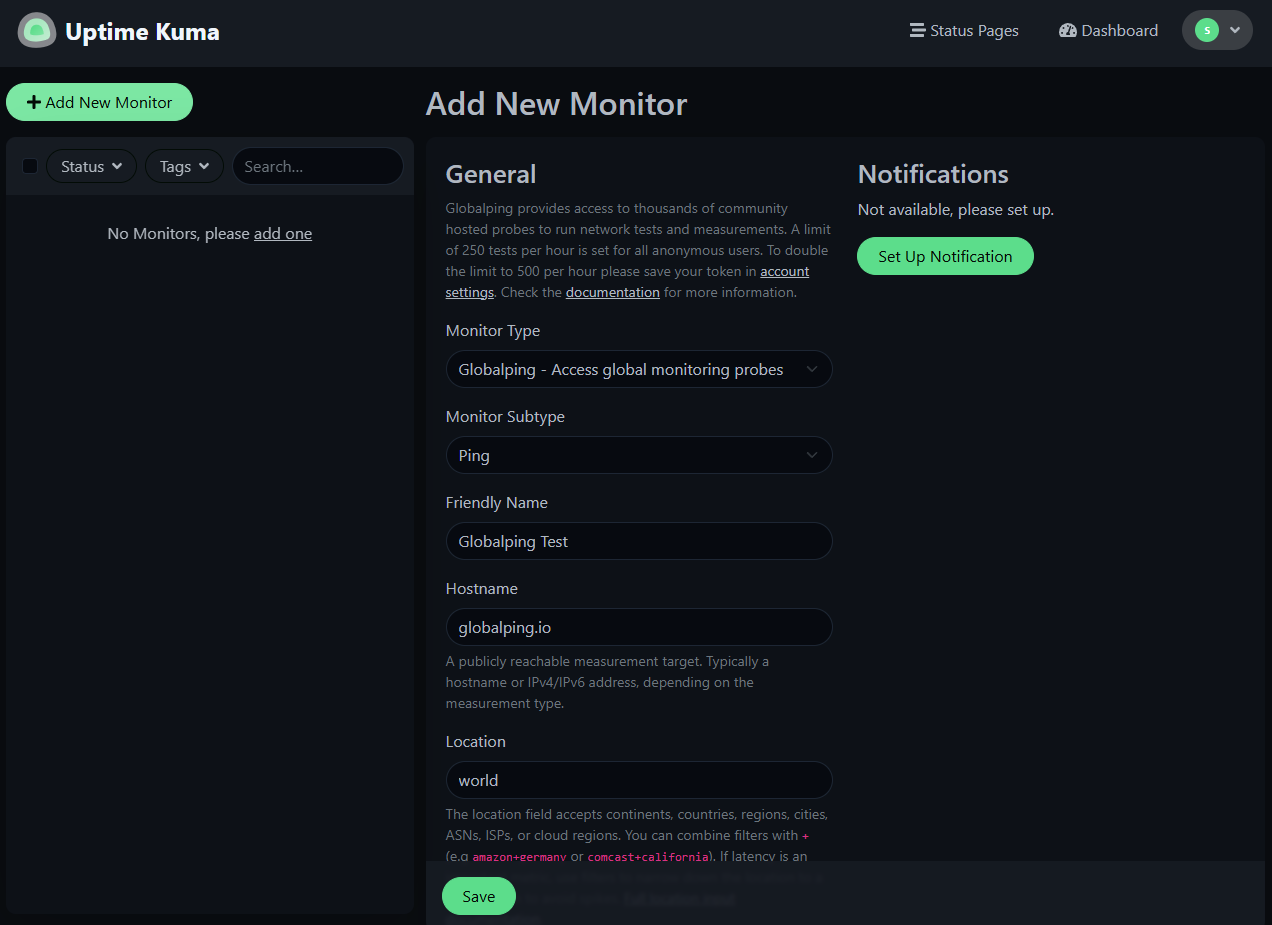
Uptime Kuma fits teams and solo devs who want a full-featured dashboard UI in their own language. Additionally, Uptime Kuma’s Globalping integration provides you with the broadest range of test types in one tool.
Read more about Globalping and Uptime Kuma on our blog.
Upptime
Upptime provides an uptime monitor with a modern status page running on GitHub Actions. It integrates with GitHub to run checks, track incidents using GitHub issues, and host status pages (made with Svelte) with outage history and long-term trend graphs via GitHub Pages. It uses a GitHub repo and a configuration file to manage your monitors, and it uses HTTP checks (POST and GET) as well as TCP ping to monitor endpoints.
Our native Globalping integration enables users to run uptime monitors from locations of their choosing, instead of only from wherever GitHub Actions run. To use Globalping, add type: globalping to a monitor in your config file. For example, this monitor runs ping from random probes in Europe:
sites:
 - name: Europe check
   url: https://api.myservice.com
   type: globalping
   location: europe
   check: tcp-ping # with type: globalping, this actually runs an ICMP ping, not TCP
Note that the integration supports HTTP GET and PING tests but not HTTP POST requests. Like with Uptime Kuma, you can define any location supported by Globalping. To authenticate with your Globalping Dashboard account, add your Globalping API token to your repository secrets and unlock increased hourly test allowance.
Upptime is great for any team that already lives in GitHub and wants no infrastructure, a static status page with version-controlled history, and doesn’t need more than HTTP and ping checks.
Read more about Globalping and Upptime on our blog.
Checkmate
The final tool in our list, Checkmate, is much broader than the other three. It tracks server hardware, Docker containers, uptime, page speed (Lighthouse score), Core Web Vitals, SSL expiry, and incidents. It provides a dashboard to manage and view your monitors and status pages, plus the ability to connect to 12 notification channels. You can set it up in different ways, including with a Docker Compose file.
The Checkmate team built the Globalping integration to monitor HTTP, TCP, and ICMP ping endpoints from six continents. To use it, toggle "Geo-Distributed Checks" on a monitor, pick one or more continents, and set a check interval.
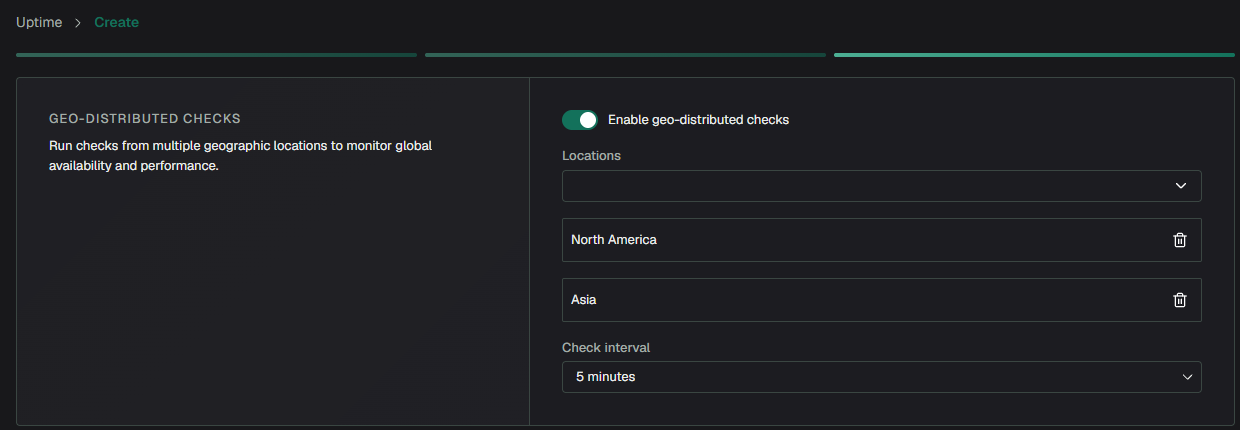
Once running, checks run through Globalping and Checkmate, so you get global and local results. There's currently no way to add a Globalping API token to raise the hourly test limit, though the default free allowance covers most use cases.
Checkmate is a great fit for teams or solo devs who want more than a simple uptime check and plan to use most of its features. However, it only supports continents for Globalping location targeting, which is coarser than what the other tools offer.
Learn more about using Globalping with Checkmate.
Which setup is right for you?
Ask yourself these three questions:
- How much infrastructure do you want to manage?
- Which (Globalping) test types do you need?
- How precise does location targeting for Globalping probes need to be?
Upptime and UptimeFlare both require the least infrastructure and support the same fine-grained Globalping location targeting. UptimeFlare can run checks more frequently and supports more monitors, but it requires a Cloudflare account. Upptime is the simplest setup because it relies on GitHub, but it’s limited to HTTP GET and ping checks.
Uptime Kuma and Checkmate both require you to run a server but provide more features. Uptime Kuma offers the widest range of Globalping test types, while Checkmate has the widest range of features overall. Checkmate, however, supports only continents for location targeting and currently doesn’t support increasing your Globalping test allowance.
We hope we could get you interested in trying one or more of these uptime monitoring tools. If you’re curious about using Globalping in other tools like Slack, agentic coding, and more, check our integration page.